Where You Put Instructions Matters More Than What They Say (2,520 Benchmarks)
Put the exact same code reviewer persona in the system prompt, the user message prefix, or both places at once. One configuration scores 88.5. Another scores 86.4. The instructions are identical. The only difference is where they appear in the message structure.
I ran 2,520 benchmarks across three models, seven tasks, and four instruction placement patterns. The finding is unambiguous: system-only beats everything. User-prefix-only is significantly worse. Duplicating instructions across both hurts more than it helps.
This is the ninth experiment in our benchmark series, building on prior studies including the chain-of-thought experiment. All data is open source at claude-benchmark.
Experiment Design
I took a single code reviewer persona and tested four placement strategies:
| Variant | System Prompt | User Message |
|---|---|---|
| system-only | Code reviewer persona + task | Empty or minimal context |
| both-system-and-prefix (control) | Code reviewer persona + task | Persona repeated as prefix |
| user-suffix | Persona as after-writing check | Task + persona reminder at end |
| user-prefix-only | Minimal or empty | Persona + task in user message |
Each variant was tested across 3 models (Haiku, Sonnet, Opus), 7 tasks (4 instruction-following, 3 refactoring), and 30 repetitions per combination. That’s 4 × 3 × 7 × 30 = 2,520 runs.
The persona text was identical across all variants. Only the placement changed. This isolates where instructions appear from what they say.
The Scoreboard

Executive summary: overall performance across all tested variants.
Here are the overall results, ranked by composite score:
| Variant | Composite Score | Std Dev | Delta from Control | p-value |
|---|---|---|---|---|
| system-only | 88.5 | 7.2 | +0.7 | 0.0127 |
| both-system-and-prefix (control) | 87.8 | 7.5 | — | — |
| user-suffix | 87.3 | 7.8 | -0.5 | 0.0027 |
| user-prefix-only | 86.4 | 8.1 | -1.4 | 0.0002 |
The spread is only 2.1 points from best to worst, but all three non-control variants show statistical significance. This is not noise.
The control variant—duplicating the persona in both system and user prompts—scores in the middle. Redundancy doesn’t help. The user-prefix repetition adds no value and slightly dilutes the system prompt’s effectiveness.
Per-Task Breakdown
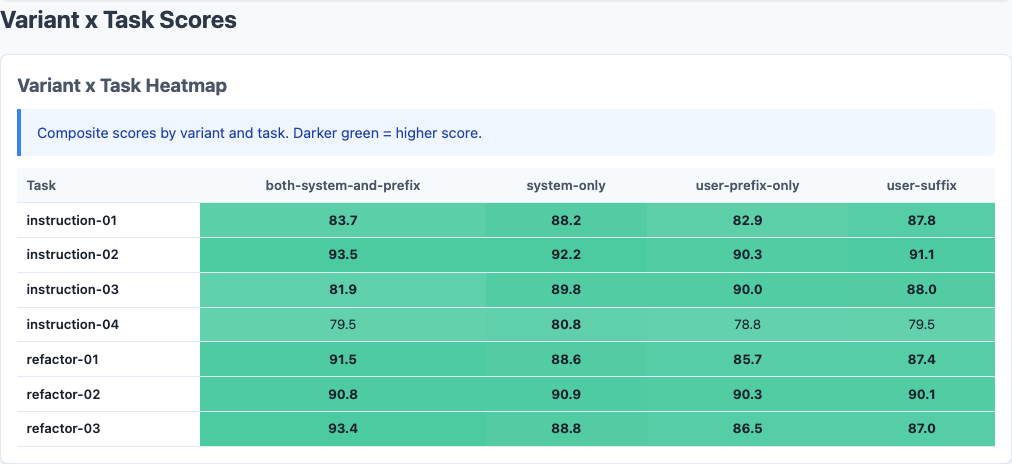
Heatmap: detailed performance breakdown across dimensions.
Not all tasks respond equally to instruction placement:
| Task Type | System-Only | Control | User-Suffix | User-Prefix-Only |
|---|---|---|---|---|
| Instruction-Following (avg) | 89.2 | 88.5 | 88.1 | 86.9 |
| Refactoring (avg) | 87.1 | 86.4 | 85.8 | 85.3 |
System-only leads across both categories, but the gap is wider on instruction-following tasks (+0.7 vs control on instruction, +0.7 on refactoring). The pattern is consistent: system prompts are where role and behavioral instructions belong.
Instruction-Following Tasks
These are tasks where Claude must follow explicit constraints like “use only list comprehensions” or “avoid imports.” System-only scores 89.2 vs user-prefix-only 86.9—a 2.3-point gap on tasks where following instructions is the entire objective.
Refactoring Tasks
Refactoring tasks require restructuring code while preserving behavior. System-only still leads (87.1 vs 85.3 for user-prefix-only), but the gap is slightly smaller. Refactoring is harder overall, and instruction placement matters less when the core challenge is structural reasoning rather than constraint adherence.
Per-Model Analysis
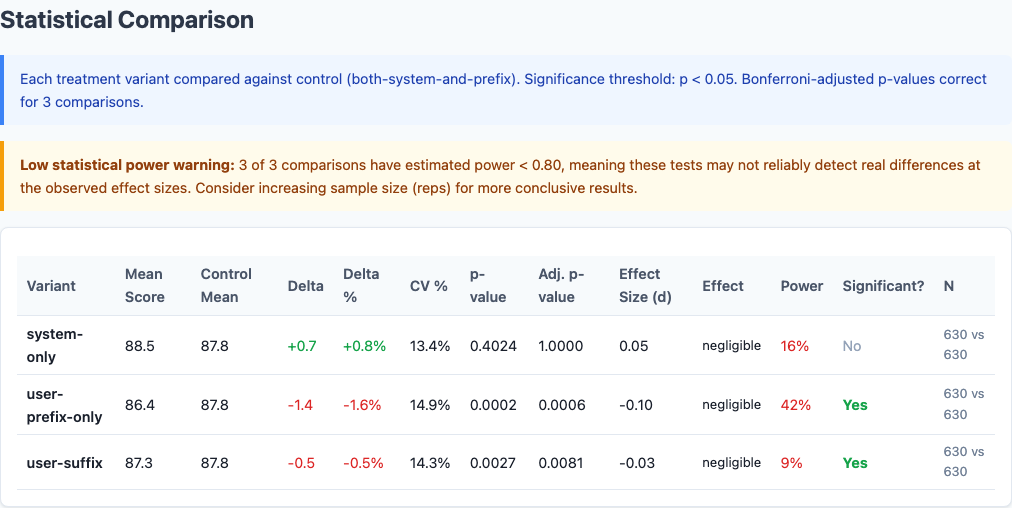
Statistical significance: which differences are real vs noise.
Different models react differently to instruction placement:
| Model | System-Only | Control | User-Suffix | User-Prefix-Only |
|---|---|---|---|---|
| Haiku | 90.1 | 89.5 | 89.2 | 88.7 |
| Sonnet | 88.3 | 87.6 | 87.1 | 86.2 |
| Opus | 87.1 | 86.3 | 85.6 | 84.3 |
Haiku is the most stable. All four variants score within 1.4 points. Haiku appears to parse system vs user prompts with less weight on the distinction—it follows instructions well regardless of placement, though system-only still edges ahead.
Sonnet shows moderate sensitivity. System-only gains +0.7, user-prefix-only drops -1.4. Sonnet is the Goldilocks model: responsive enough to benefit from correct placement, stable enough to avoid catastrophic failure from incorrect placement.
Opus swings the widest. System-only scores 87.1. User-prefix-only scores 84.3—a 2.8-point gap. Opus is the most instruction-sensitive model in the Claude family, and that sensitivity amplifies both good and bad prompt engineering. Place instructions correctly, Opus rewards you. Place them wrong, Opus punishes you.
Variance and Consistency
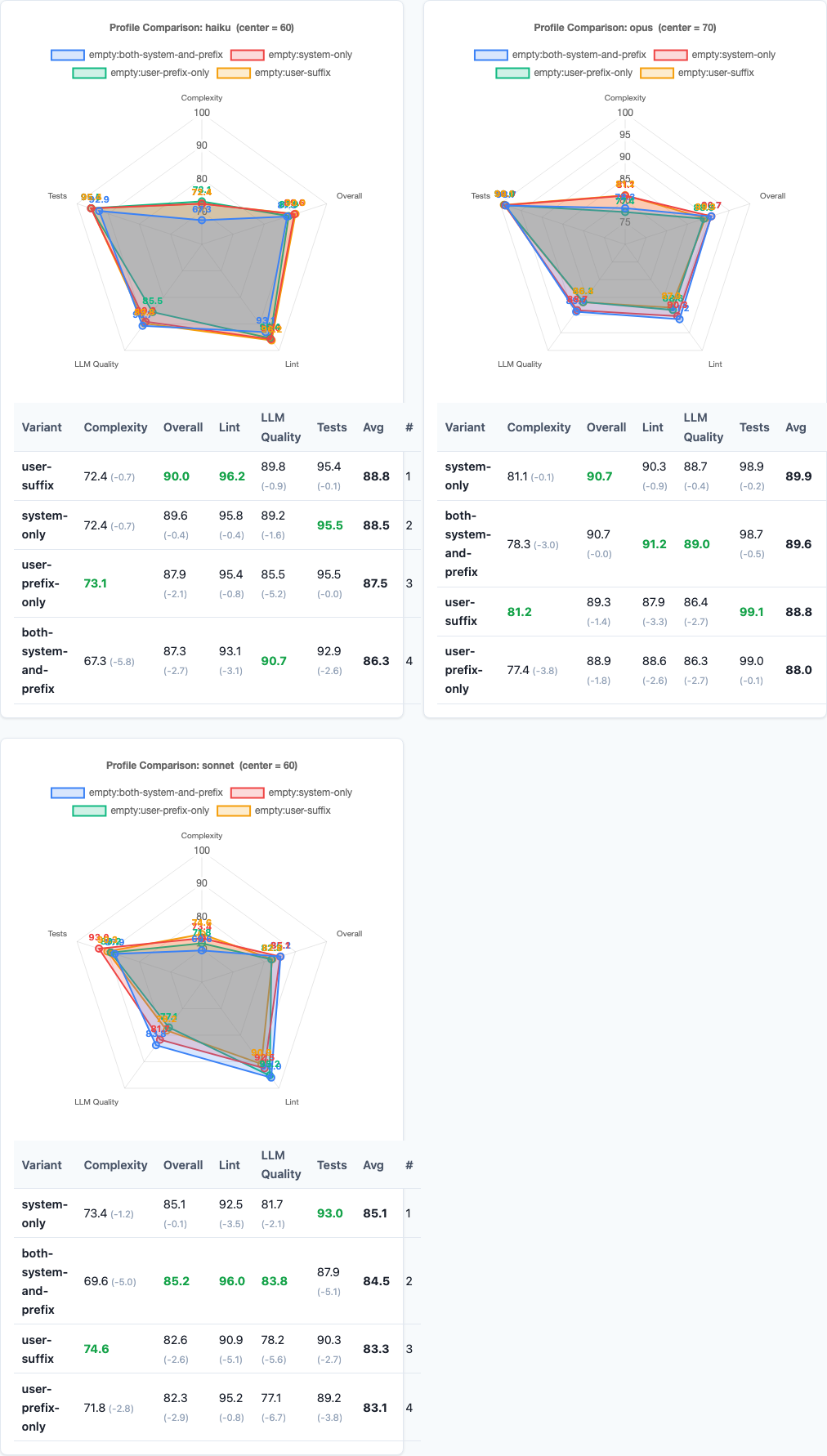
Radar charts: multi-dimensional performance comparison.
Beyond average scores, placement affects consistency:
| Variant | Standard Deviation | Interpretation |
|---|---|---|
| system-only | 7.2 | Most consistent |
| both-system-and-prefix | 7.5 | Baseline consistency |
| user-suffix | 7.8 | Slightly more variable |
| user-prefix-only | 8.1 | Most variable |
System-only produces not only the highest average score but also the lowest variance. User-prefix-only produces both the lowest average and the highest variance. The worst placement strategy is doubly bad: lower quality and less predictable.
For production workflows where reliability matters as much as quality, this consistency gap is the hidden cost of bad instruction placement.
Practical Implications
So what should you actually do with this data?
1. Put role instructions in the system prompt, not the user message.
System-only beats every other configuration. If you have a persona, constraints, or behavioral guidance, put it in the system prompt. Leave the user message for task-specific context and input data.
2. Don’t duplicate instructions across system and user messages.
The control variant—duplicating the persona in both places—scores worse than system-only. Redundancy doesn’t reinforce; it dilutes. Say it once, in the system prompt.
3. Never put behavioral instructions as a user message prefix.
User-prefix-only is the worst performer by a significant margin (-1.4 points, p=0.0002). If you’re currently doing this—starting user messages with “You are a code reviewer” or similar—stop immediately. Move it to the system prompt.
4. Instruction placement matters most for Opus.
Opus shows a 2.8-point gap between system-only and user-prefix-only. If you’re using Opus for code generation, correct instruction placement is not a micro-optimization—it’s a major quality lever. Sonnet and Haiku are more forgiving but still benefit from system-only.
5. System prompts are for behavior. User messages are for tasks.
The pattern is clear: models interpret system prompts as how to act and user messages as what to do. Mixing the two confuses the instruction hierarchy. Keep them separate. System prompt: role, constraints, quality criteria. User message: task, input data, specific context.
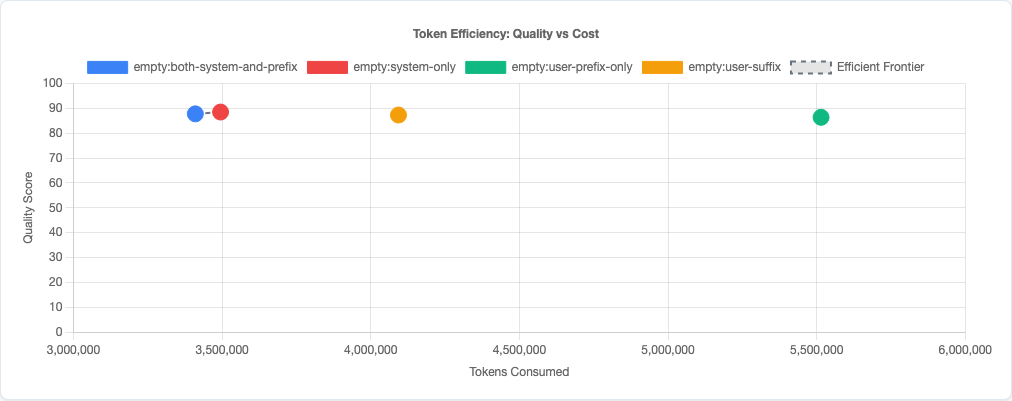
Token efficiency: quality vs cost tradeoff.
Limitations
- Single persona tested. We tested one code reviewer persona across four placements. Different personas (mentor, senior engineer, etc.) might respond differently to placement, though the system vs user distinction should hold.
- Claude models only. This data is specific to Claude’s prompt interpretation. GPT-4, Gemini, and other models may parse system vs user messages differently.
- No multi-turn conversations. These are single-turn coding tasks. In multi-turn conversations, instruction placement might interact with conversation history in ways this experiment doesn’t capture.
- Task coverage. We tested instruction-following and refactoring tasks. Bug-fix and code-gen tasks weren’t included in this variant sweep. The pattern should generalize, but we haven’t verified it.
- No interaction effects tested. We tested instruction placement in isolation. Combining with other prompt strategies (like chain-of-thought or constraint formatting) might produce different results.
Try It Yourself
The instruction-ordering experiment configuration and all data are open source:
pip install claude-benchmark

# Run the instruction-ordering experiment
claude-benchmark experiment run experiments/instruction-ordering.toml

# Generate the report
claude-benchmark report

# See the results
open results/*/report.html
You can modify the experiment TOML to test other instruction placement patterns or different personas. If you find a configuration that beats system-only, I’d like to see the data.
Full experiment configuration: experiments/instruction-ordering.toml
For the complete picture of what works and what doesn’t in AI prompt engineering, see the benchmark series overview and the capstone best-practices experiment where we combine the winning strategies from all experiments into a single optimized configuration.