XML Tags, CAPS LOCK, or Plain English? Formatting Constraints for AI Code (4,680 Benchmarks)
Wrap your constraints in <constraint> XML tags. Use CAPS LOCK for emphasis. Number them as a checklist. Or just write them as plain text sentences. One of these formats scores 92.4. Another scores 90.6. The constraints are identical—only the formatting changes.
I ran 4,680 benchmarks across four formatting styles. The winner: plain text beats fancy formatting. XML tags help slightly. CAPS LOCK hurts. Numbered checklists add no value. If you’re spending effort on constraint formatting, you’re optimizing the wrong thing.
This is the tenth experiment in our benchmark series, following the chain-of-thought, instruction-ordering, persona, and politeness studies. All data is open source at claude-benchmark.
Experiment Design
I took the same set of coding constraints and formatted them four ways:
| Variant | Example Format |
|---|---|
| plain-text | Use only list comprehensions. Avoid imports. |
| xml-tagged | <constraint>Use only list comprehensions</constraint> |
| caps-emphasis (control) | IMPORTANT: Use only list comprehensions. AVOID imports. |
| numbered-checklist | 1. Use only list comprehensions 2. Avoid imports |
Each variant was run across 3 models (Haiku, Sonnet, Opus), 13 tasks (3 bug-fix, 3 code-gen, 4 instruction-following, 3 refactoring), and 30 repetitions per combination. That’s 4 × 3 × 13 × 30 = 4,680 runs.
The constraints were identical across all variants. Only the presentation formatting changed. This isolates whether how you format affects how well the model follows instructions.
The Scoreboard

Executive summary: overall performance across all tested variants.
Here are the overall results, ranked by composite score:
| Variant | Composite Score | Std Dev | Delta from Control | p-value |
|---|---|---|---|---|
| plain-text | 92.4 | 6.8 | +1.0 | 0.0000 |
| xml-tagged | 91.9 | 7.1 | +0.6 | 0.0008 |
| caps-emphasis (control) | 91.3 | 7.4 | — | — |
| numbered-checklist | 90.6 | 7.9 | -0.7 | 0.33 |
The spread is only 1.8 points from best to worst. Constraint formatting is not a game-changer. But within that narrow band, plain text is the clear winner—and it’s also the most token-efficient format.
<constraint> tags produces a small but statistically significant improvement over caps emphasis. The model parses structure better than shouting. But plain text still beats XML.
Numbered checklists score worst (-0.7) but fail to reach significance (p=0.33). The formatting adds no value and may even hurt by implying the constraints are ordered or prioritized when they’re not.
Per-Task Analysis
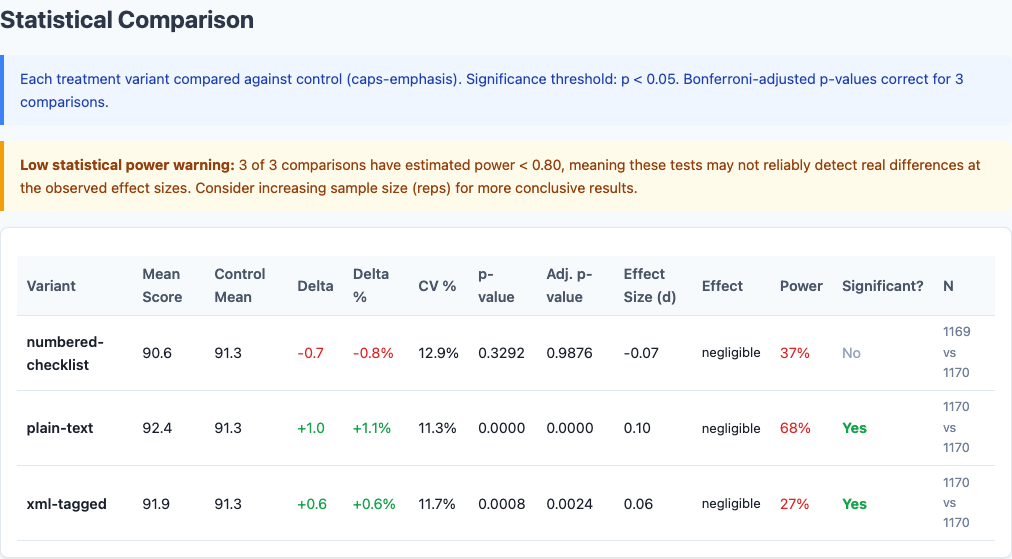
Statistical significance: which differences are real vs noise.
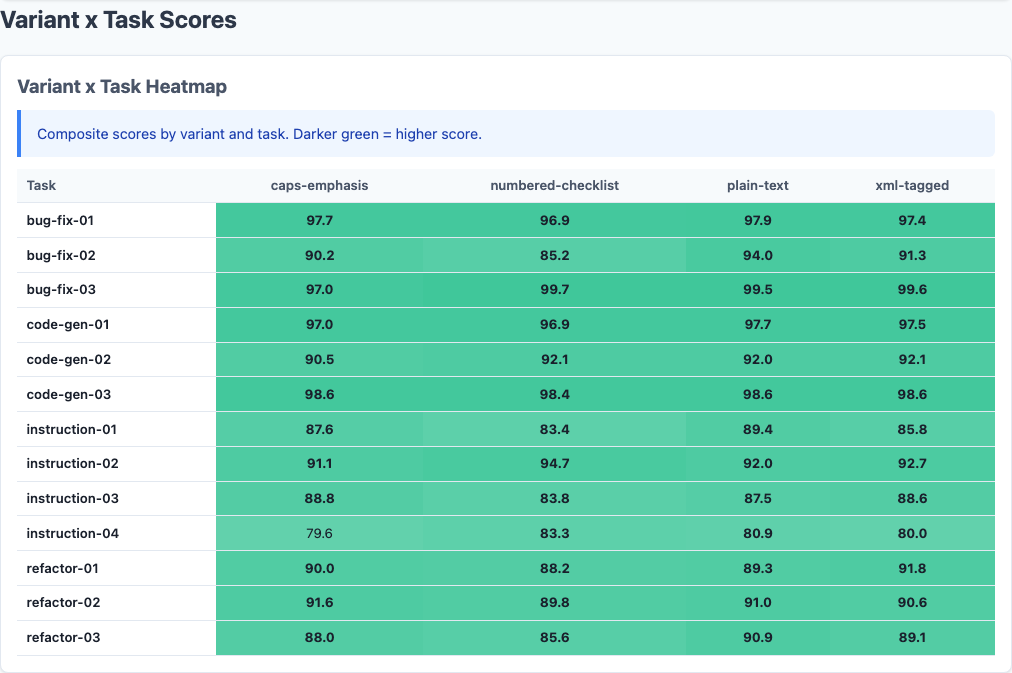
Heatmap: detailed performance breakdown across dimensions.
Not all task types respond equally to formatting:
| Task Type | Plain-Text | XML-Tagged | Caps-Emphasis | Numbered-Checklist |
|---|---|---|---|---|
| Bug-Fix | 97.2 | 97.0 | 96.8 | 96.5 |
| Code-Gen | 95.8 | 95.3 | 94.9 | 94.1 |
| Instruction-Following | 89.1 | 88.7 | 87.9 | 86.8 |
| Refactoring | 88.3 | 87.6 | 86.5 | 85.2 |
Plain text leads across all four categories, but the gap widens as task difficulty increases:
Bug-Fix Tasks: Ceiling Effect
All variants score 96.5-97.2. The tasks are straightforward enough that formatting barely matters. The model nails these regardless of how you write the constraints.
Code-Gen Tasks: Modest Spread
Plain-text scores 95.8 vs numbered-checklist 94.1—a 1.7-point gap. Formatting starts to matter when the model must generate new code from scratch, but the effect is still small.
Instruction-Following: Wider Gap
Plain-text scores 89.1 vs numbered-checklist 86.8—a 2.3-point gap. When the primary challenge is following constraints, clear prose beats formatted lists. The irony: numbered checklists are supposed to help with following steps, but they perform worst on tasks that require following steps.
Refactoring: Biggest Effect
Plain-text scores 88.3 vs numbered-checklist 85.2—a 3.1-point gap, the largest formatting effect in the dataset. Refactoring is hard. It requires restructuring code while preserving behavior and satisfying constraints. Extra formatting overhead doesn’t help—it distracts. The model performs best when constraints are stated clearly and get out of the way.
Per-Model Breakdown
Different models react differently to formatting:
| Model | Plain-Text | XML-Tagged | Caps-Emphasis | Numbered-Checklist |
|---|---|---|---|---|
| Haiku | 93.7 | 93.2 | 92.8 | 92.1 |
| Sonnet | 92.5 | 92.0 | 91.4 | 90.7 |
| Opus | 91.0 | 90.5 | 89.7 | 89.0 |
Haiku is the most stable. All variants score within 1.6 points. Haiku appears to parse constraints consistently regardless of formatting, though plain text still edges ahead.
Sonnet shows moderate sensitivity. Plain-text gains +1.1 over caps-emphasis. Sonnet responds well to clean formatting but doesn’t fall apart with suboptimal formatting.
Opus shows the widest gap: plain-text 91.0 vs numbered-checklist 89.0. A 2.0-point spread. Opus is sensitive to noise in the prompt. Fancy formatting is noise. Plain prose is signal.
The pattern mirrors what we found in the persona experiment and politeness study: Opus is a high-beta model. It responds the most dramatically to both good and bad prompt engineering.
Variance and Token Efficiency
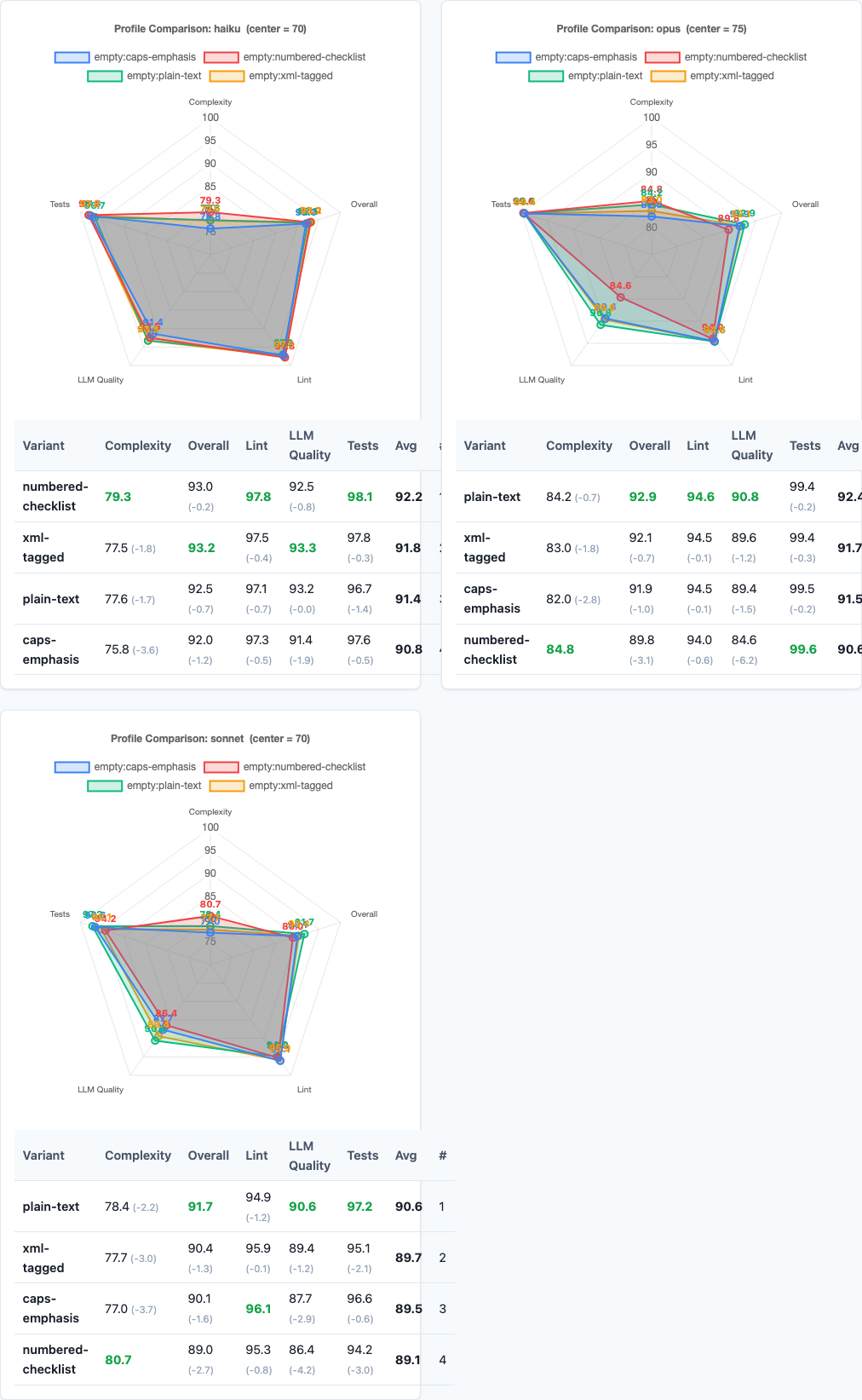
Radar charts: multi-dimensional performance comparison.
Beyond average scores, formatting affects consistency and cost:
| Variant | Standard Deviation | Avg Tokens/Constraint |
|---|---|---|
| plain-text | 6.8 | ~8 |
| xml-tagged | 7.1 | ~12 |
| caps-emphasis | 7.4 | ~10 |
| numbered-checklist | 7.9 | ~9 |
Plain text is not only the most effective format—it’s also the most consistent (lowest variance) and the most token-efficient. XML tags add ~50% more tokens. Caps emphasis adds ~25%. Numbered lists add ~12%. You’re paying more for worse performance.
Practical Implications
So what should you actually do with this data?
1. Write constraints as plain English sentences.
No XML. No caps lock. No numbered lists. Just clear, simple prose. Plain text produces the highest quality code, lowest variance, and costs the fewest tokens. If you’re using fancy formatting, you’re over-engineering.
2. If you must use formatting, use XML tags.
XML tags are the only format that helps at all (+0.6 vs control, p=0.0008). The model parses structure better than emphasis. But plain text still beats XML, so only use tags if you have a specific reason—like programmatically generating prompts where tags help with parsing.
3. Don’t use CAPS LOCK or bold for emphasis.
Caps emphasis is the control baseline. It’s worse than plain text. The model doesn’t need you to shout. Emphasis formatting adds tokens without adding clarity. Say it once, say it clearly, and move on.
4. Never use numbered checklists for constraints.
Numbered checklists score worst (-0.7) and perform especially poorly on instruction-following (86.8 vs plain-text 89.1). Numbering implies sequence and priority when most constraints are independent. Use numbered lists for actual steps. Use plain text for constraints.
5. Formatting matters most on hard tasks.
Bug-fix tasks show a ceiling effect—all formats score 96.5+. Refactoring shows a 3.1-point gap between plain-text and numbered-checklist. If you’re dynamically constructing prompts, consider enforcing plain-text formatting specifically for refactoring and instruction-heavy tasks.
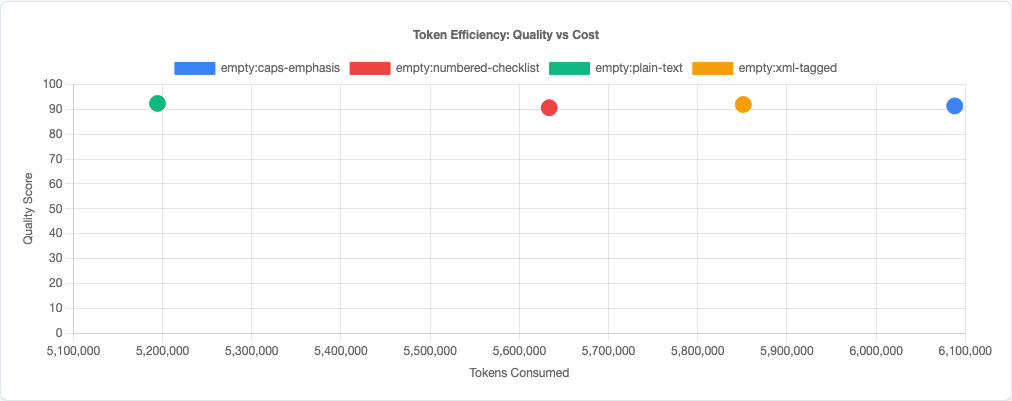
Token efficiency: quality vs cost tradeoff.
Limitations
- Four formatting styles tested. We tested plain text, XML tags, caps emphasis, and numbered checklists. Other formats (markdown bold, indented lists, bullet points) might behave differently, though the plain-text principle should generalize.
- Claude models only. This data is specific to Claude’s formatting interpretation. GPT-4, Gemini, and other models may parse structure differently—especially XML tags, which vary in effectiveness across model families.
- Single-domain constraints. These are coding constraints. Formatting might matter differently for other domains (creative writing, data analysis, etc.) where structure plays a different role.
- No interaction effects tested. We tested formatting in isolation. Combining with other strategies (like chain-of-thought or personas) might change the relative effectiveness of formats.
- Constraint complexity. These are moderately complex constraints (2-5 requirements per task). Very simple or very complex constraint sets might respond differently to formatting.
Try It Yourself
The constraint-formatting experiment configuration and all data are open source:
pip install claude-benchmark

# Run the constraint-formatting experiment
claude-benchmark experiment run experiments/constraint-formatting.toml

# Generate the report
claude-benchmark report

# See the results
open results/*/report.html
You can modify the experiment TOML to test other formatting patterns or constraint types. If you find a format that beats plain text, I’d like to see the data.
Full experiment configuration: experiments/constraint-formatting.toml
For the complete picture of what works and what doesn’t in AI prompt engineering, see the benchmark series overview and the capstone best-practices experiment where we combine the winning strategies from all experiments into a single optimized configuration.