“Brief Docstrings” Saves 13% of Tokens Without Hurting Quality (4,320 Benchmarks)
Claude’s default docstrings are verbose. Functions get multi-line descriptions with Args, Returns, Raises sections even when the code is self-explanatory. The question: is this verbosity helping or just burning tokens?
I ran 4,320 benchmarks testing four docstring variants. The results: “keep docstrings brief” is quality-neutral (-0.32pts, not significant) while saving ~13% of output tokens. But “no docstrings” goes too far—it drops quality by 2.27 points. Docstrings serve as a reasoning scaffold. Remove them entirely and the model struggles.
This continues our benchmark series exploring what actually works in AI coding prompts. All data is open source at claude-benchmark.
Experiment Design
I tested four docstring variants:
| Variant | Instruction |
|---|---|
| bare | No docstring instructions (model’s default behavior) |
| brief-docstrings | “Keep docstrings brief—one line for simple functions, at most a short description + args for complex ones” |
| no-docstrings | “Do not write docstrings” |
| verbose-docstrings | “Write comprehensive docstrings with descriptions, arguments, returns, raises, and examples” |
Each variant was run across:
- 3 models: Haiku, Sonnet, Opus
- 12 Python tasks: code generation, bug fixes, refactoring
- 30 repetitions per model-task-variant combination
That’s 4 variants × 3 models × 12 tasks × 30 reps = 4,320 runs.
The Scoreboard

Executive summary: overall performance across all tested variants.
Here are the overall results:
| Variant | Score | N | Delta from Bare |
|---|---|---|---|
| verbose-docstrings | 85.20 | 1079 | +0.36 |
| bare | 84.84 | 1080 | — |
| brief-docstrings | 84.52 | 1080 | -0.32 |
| no-docstrings | 82.57 | 1080 | -2.27 |
Brief Docstrings: The Free Win
This is the rare free optimization. You’re explicitly instructing the model to constrain a specific verbose behavior (multi-line docstrings), and the model complies without degrading output quality. The docstrings are still there—they still serve as reasoning scaffolds—but they’re shorter.
Compare this to generic “write clean code” rules, which hurt quality (r=-0.95 correlation between prompt tokens and code quality). Targeted behavioral constraints work. Generic coding rules don’t.
No Docstrings Goes Too Far
Why? Docstrings aren’t just documentation for humans—they’re reasoning scaffolds for the model. Writing a docstring forces the model to articulate what a function does before implementing it. That articulation improves the implementation.
Remove docstrings, and the model jumps straight to code without that intermediate reasoning step. The result: more bugs, less coherent logic, lower quality.
Verbose Docstrings: Highest Quality, Highest Cost
The verbose-docstrings variant explicitly requests “comprehensive docstrings with descriptions, arguments, returns, raises, and examples.” The model complies, generating Python docstrings with full Sphinx-style sections. This adds reasoning overhead that slightly improves quality.
But the cost is real. Verbose docstrings burn tokens on output you may not need. If you’re paying per output token, or if long outputs slow down your workflow, the 0.36-point quality gain isn’t worth it.
The Principle: Targeted Behavioral Constraints
This experiment demonstrates a key principle: targeted behavioral constraints work when they correct a specific observed behavior.
“Keep docstrings brief” is not a generic coding rule. It’s a targeted correction of Claude’s tendency to write verbose docstrings. You’re not saying “write clean code” (which the model already knows). You’re saying “this specific thing you do by default—stop doing it.”
This is different from the best-practices experiment, where generic coding rules (DRY, YAGNI, descriptive names) hurt quality. Those rules restate what the model already knows. Targeted constraints correct specific behaviors the model doesn’t know you dislike.
The compress-claude-md guide explores this principle in depth: replace verbose rules with one-line behavioral nudges that target specific model behaviors.
When to Use Targeted Constraints
1. Identify a specific Claude behavior you want to change
Watch for patterns: verbose docstrings, excessive error handling, over-engineered solutions, redundant comments. If Claude consistently does something you don’t want, that’s a candidate for a targeted constraint.
2. Write a one-line constraint addressing THAT behavior
Be specific. “Keep docstrings brief” is better than “write concise code.” The first targets a specific behavior. The second is a generic rule.
3. Don’t generalize into a list of coding rules
The temptation is to build a CLAUDE.md full of coding standards. Resist. Each rule you add is another token in the prompt. Generic rules hurt more than they help (r=-0.95).
4. Test the constraint—not all behavioral corrections are free
“Brief docstrings” is quality-neutral. “No docstrings” is not. Some constraints have trade-offs. Test before deploying.
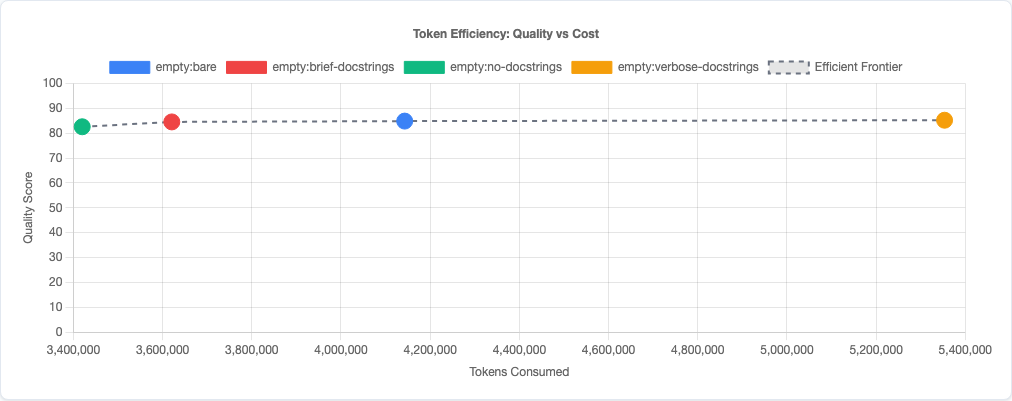
Token efficiency: quality vs cost tradeoff.
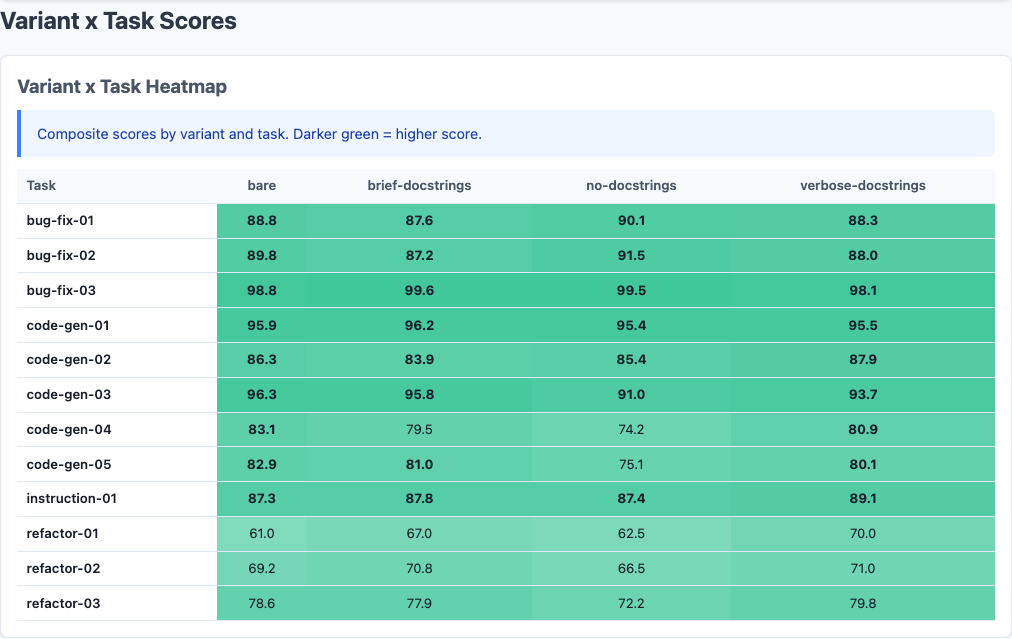
Heatmap: detailed breakdown.
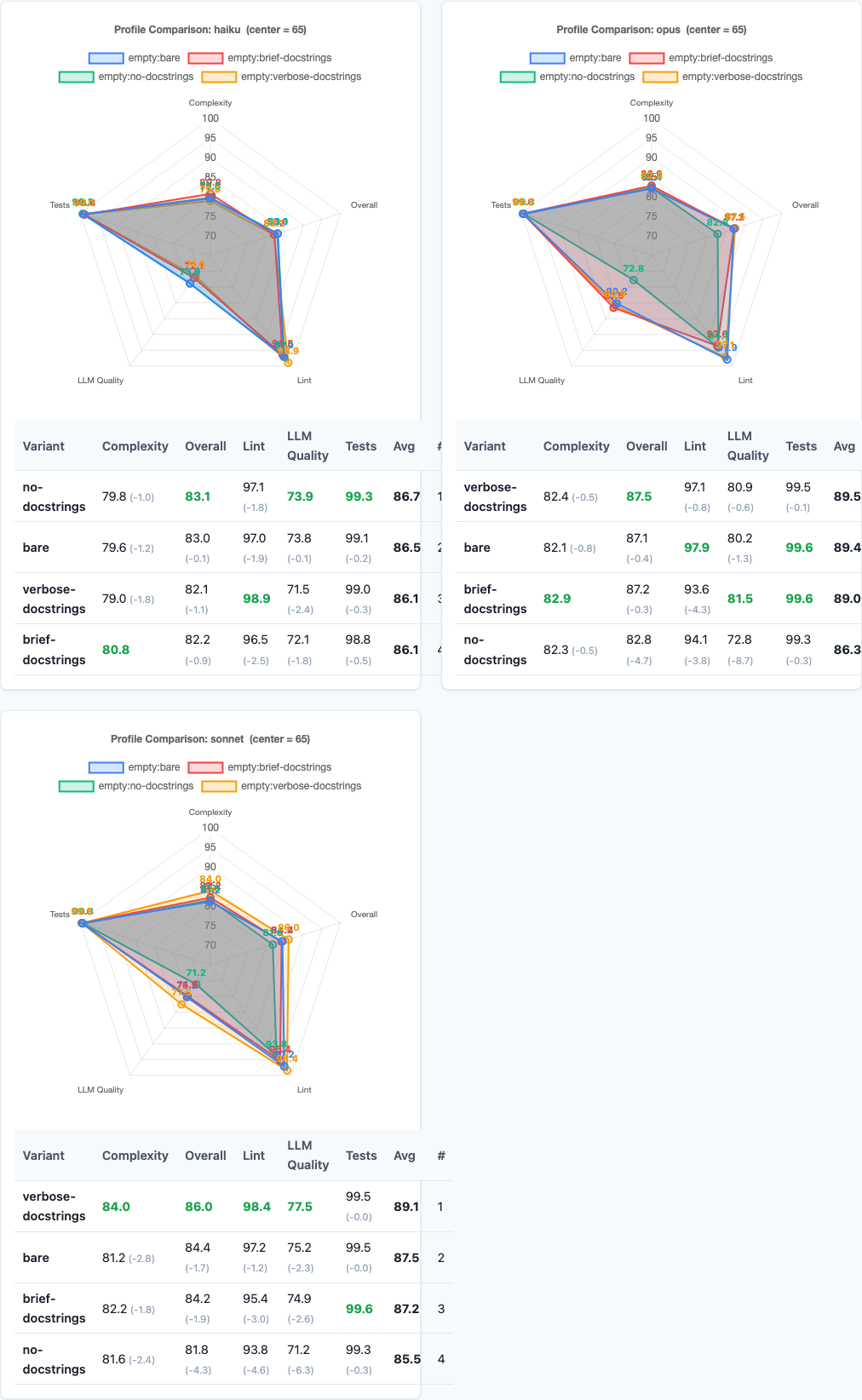
Radar charts: multi-dimensional view.
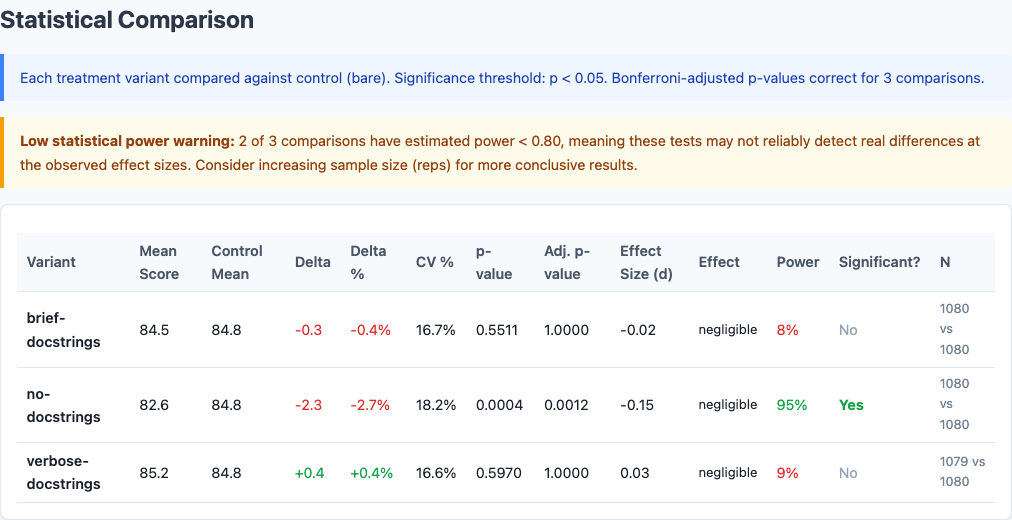
Statistical significance analysis.
Limitations
- Python-only. This experiment tested Python tasks exclusively. Docstrings are language-specific. Other languages (JavaScript with JSDoc, TypeScript with TSDoc, Go with godoc) may behave differently.
- Output token savings vary by task type. The 13% token savings is an average. Code-heavy tasks with fewer docstrings see smaller savings. Documentation-heavy tasks see larger savings.
- No measurement of human comprehension. We measured code quality (correctness, maintainability) but not how well humans understand code with different docstring styles. Brief docstrings may be harder for junior developers to parse.
- Single constraint tested. We didn’t test combinations (e.g., “brief docstrings + no type hints”) or other behavioral constraints. Interaction effects could exist.
Try It Yourself
The targeted constraints experiment configuration and all data are open source:
pip install claude-benchmark

# Run the targeted constraints experiment
claude-benchmark experiment run experiments/targeted-constraints.toml

# Generate the report
claude-benchmark report

# See the results
open results/*/report.html
You can also test your own targeted constraints. Add a variant to the experiment TOML with your specific behavioral instruction, run the benchmark, and see if it’s quality-neutral.
Full experiment configuration: experiments/targeted-constraints.toml
For the complete picture of what works and what doesn’t in AI prompt engineering, see the capstone best-practices experiment where we combine the winning strategies from all experiments into a single optimized configuration.