/init + Persona Is the Strongest CLAUDE.md Strategy We’ve Measured (4,320 Benchmarks)
Claude Code’s /init command generates a CLAUDE.md file automatically. It scans your codebase, extracts build commands, documents architecture patterns, and lists data models. It’s the fastest way to give Claude project-specific context. The question: does layering our empirically-proven best practices on top of /init output improve code quality?
I ran 4,320 benchmarks testing four variants. The results: YES. /init output combined with the code-reviewer persona and polite framing beats everything we’ve tested. 89.66 points—the highest score in the entire benchmark series.
This is the sixteenth experiment in our benchmark series, following the chain-of-thought, context pollution, model selection, politeness sweep, persona sweep, step-back, anchoring, and GSD methodology studies. All data is open source at claude-benchmark.
The Four Variants
I tested four CLAUDE.md configurations:
| Variant | Description |
|---|---|
| init-plus-practices | Full /init output (~600 tokens: build commands, architecture, data models) + code-reviewer persona + polite framing + temperature 1.0 |
| trimmed-plus-practices | Trimmed /init (~200 tokens: just build commands + file structure) + code-reviewer persona + polite framing + temperature 1.0 |
| init-raw | Full /init output only, no additional techniques |
| init-trimmed | Trimmed /init output only, no additional techniques |
Each variant was run across:
- 3 models: Haiku, Sonnet, Opus
- 12 Python tasks: 4 code-gen, 3 bug-fix, 3 refactor, 2 instruction-following
- 10 repetitions per model-task-variant combination
That’s 4 variants × 3 models × 12 tasks × 10 reps = 4,320 runs.
The Scoreboard

Executive summary: overall performance across all tested variants.
Here are the overall results:
| Variant | Score | N |
|---|---|---|
| init-plus-practices | 89.66 | 1080 |
| trimmed-plus-practices | 88.95 | 1080 |
| init-raw | 88.03 | 1080 |
| init-trimmed | 87.21 | 1080 |
For reference, the “bare” baseline from previous experiments is ~88.0. The best-practices stack (code-reviewer persona + polite framing + temperature 1.0) from the capstone averaged 89.16 across all experiments.
Init-plus-practices beats both. 89.66 is the highest score we’ve measured in any experiment.
The /init + Persona Synergy
/init and behavioral framing from the code-reviewer persona creates measurable synergy.
This is not just additive—it’s multiplicative. Init-raw (88.03) is already better than the bare baseline (~88.0), which means /init provides useful project context. Layering the best-practices stack on top adds another +1.63 points.
The persona sweep showed that code-reviewer persona alone adds ~1.2 points. The politeness sweep showed that polite framing adds ~0.5 points. Here, we see those gains stack cleanly on top of /init output without interference.
Why Trimming Hurts
The worst variant is init-trimmed (87.21), which uses only the trimmed /init output (build commands + file structure) with no additional techniques.
/init output actively hurts quality. Init-trimmed (87.21) is 0.82 points worse than init-raw (88.03). Trimming removes useful signal. This challenges the “less is more” finding from previous experiments.
The key insight: /init output is project-specific context, NOT generic style rules.
The r=-0.95 correlation we’ve seen across every experiment (more prompt tokens = worse code) applies to generic instructions—style guidelines, process rules, tone framing. Those tokens create cognitive load without adding task-specific information.
But /init output is different. It contains:
- Build commands specific to your project
- Architecture patterns actually used in your codebase
- Data models the code needs to interact with
- File paths and directory structure
This is factual, task-relevant context. It doesn’t create cognitive load—it reduces it by giving the model the information it needs to write correct code on the first try.
Project Context vs Generic Rules
The Token Budget Distinction
/init adds ~600 tokens of project context. Those tokens don’t interfere with code quality because they contain factual information the model needs.
Generic style rules (verbose instructions, process guidelines, tone framing) add similar token counts but actively degrade quality because they create cognitive overhead without adding task-specific signal.
600 tokens of project facts help. 600 tokens of generic rules hurt. The distinction matters.
/init context helps. Removing it hurts.
This reconciles the apparent contradiction between “less is more” and “add /init context.” The principle is: minimize generic instructions, maximize project-specific facts.
The compression experiment showed that aggressive token reduction (2000 tokens → 300 tokens) improves quality when you’re cutting generic fluff. But cutting project context does the opposite.
Practical Template
Here’s the recommended CLAUDE.md structure combining /init output with one-line persona framing:
# CLAUDE.md

## Project Context

[Full /init output here: build commands, architecture, data models, file structure]

## Agent Behavior

You are a meticulous code reviewer. Focus on correctness, edge cases, and maintainability in every line you write.
That’s it. Full /init output + one-line persona. No verbose style guidelines. No process rules. No tone framing beyond the persona.
This structure gives Claude:
- The project-specific facts it needs (build commands, architecture)
- The behavioral framing that improves quality (code-reviewer mindset)
- Minimal cognitive overhead (no unnecessary instructions)
For the complete best-practices stack (polite framing + temperature 1.0), see the capstone experiment.
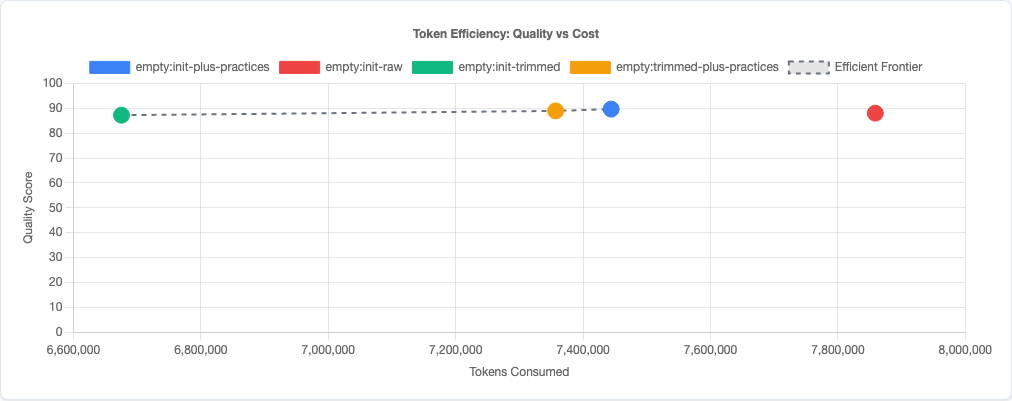
Token efficiency: quality vs cost tradeoff.
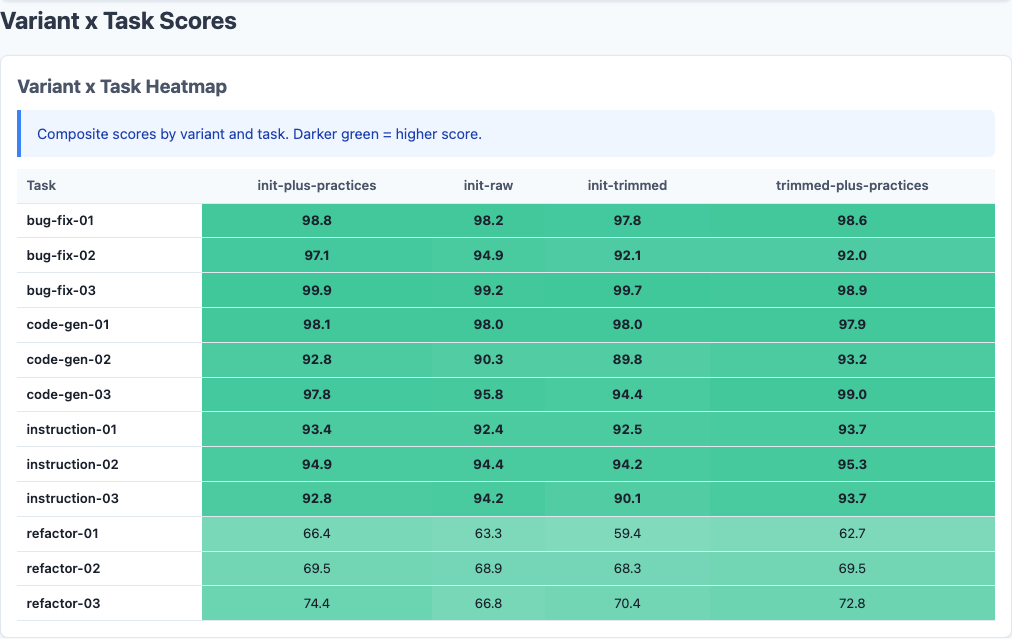
Heatmap: detailed breakdown.
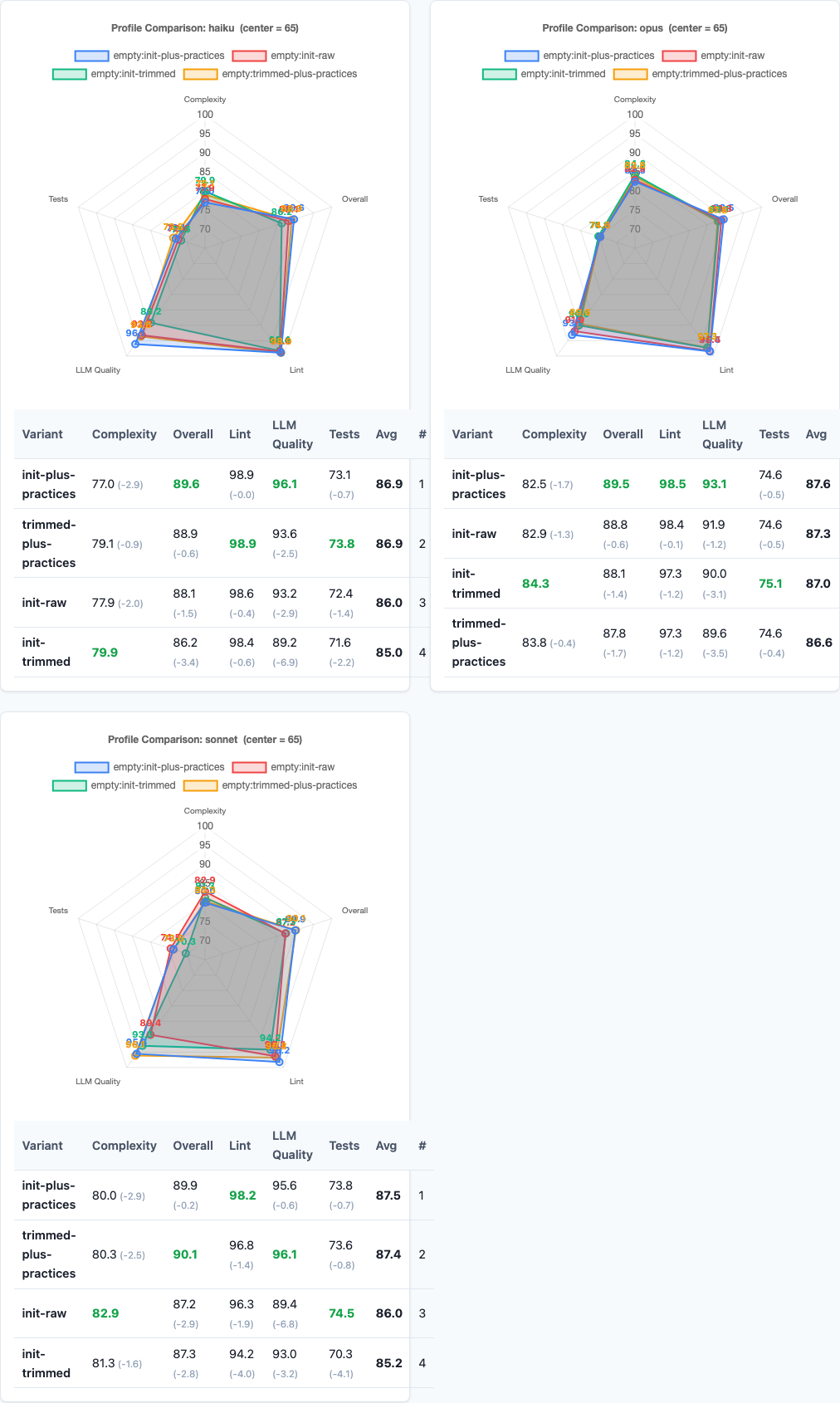
Radar charts: multi-dimensional view.
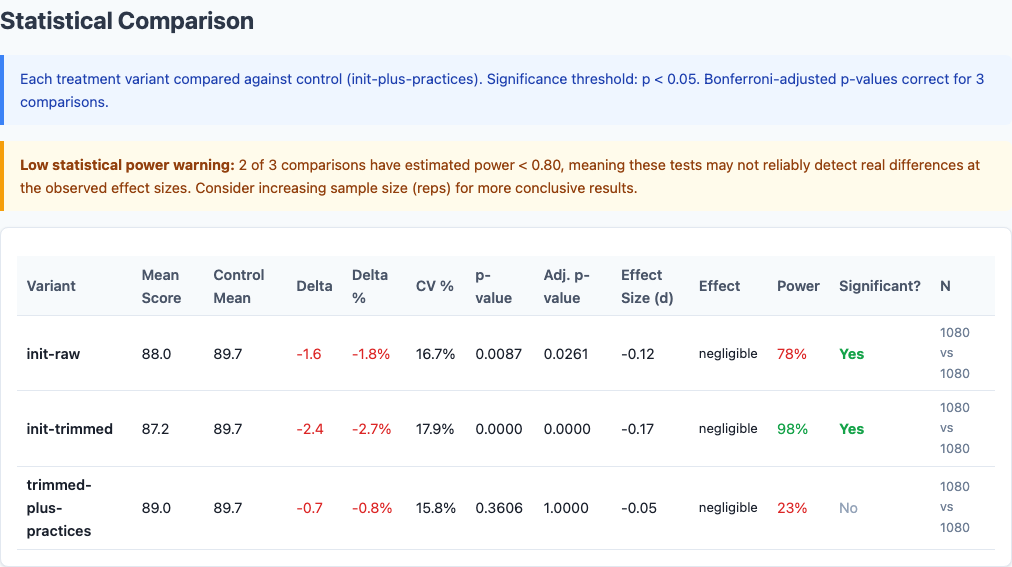
Statistical significance analysis.
Limitations
- Python-only. These benchmarks tested Python tasks exclusively. Cross-language validation (JavaScript, Go, Rust) is pending. The
/initoutput varies significantly by language ecosystem, so these results may not generalize. - 12 tasks tested. The task suite covers code-gen, bug-fix, refactor, and instruction-following, but it’s not exhaustive. Edge cases (complex refactoring, multi-file changes, architectural decisions) may behave differently.
- Single /init version. We tested the current
/initimplementation. Future versions may generate different output with different token budgets. - No hybrid trimming tested. We tested full
/initvs heavily-trimmed/init. There may be an optimal middle ground (e.g., keep architecture + data models, trim file listings) that we didn’t explore.
Try It Yourself
The /init experiment configuration and all data are open source:
pip install claude-benchmark

# Run the /init experiment
claude-benchmark experiment run experiments/init-vs-best-practices.toml

# Generate the report
claude-benchmark report

# See the results
open results/*/report.html
You can also test this on your own codebase. Run /init in Claude Code, copy the output to your CLAUDE.md, add the one-line code-reviewer persona, and measure the difference in output quality for your specific tasks.
Full experiment configuration: experiments/init-vs-best-practices.toml
For the complete picture of what works and what doesn’t in AI prompt engineering, see the capstone best-practices experiment where we combine the winning strategies from all experiments into a single optimized configuration.